
The Anatomy of an Automated 'AI Content' Stamp
If you produce photorealistic visual assets using Midjourney v6, OpenAI DALL-E 3, Grok, or Google Imagen, you have likely encountered an unwelcome surprise: within seconds of publishing to Instagram, Threads, or Facebook, a persistent grey badge appears underneath your profile handle: 'AI content'.
Most creators assume Instagram employs sophisticated computer vision models that analyze lighting inconsistencies, skin texture, or pupil reflections to detect artificial generation. In reality, platform ingestion pipelines perform zero visual inference on upload. The detection is 100% mechanical: social media platforms simply read invisible cryptographic metadata manifests known as C2PA (Coalition for Content Provenance and Authenticity) hardcoded into the file binary.
Inside the Binary: What Generative Engines Write Into Your File
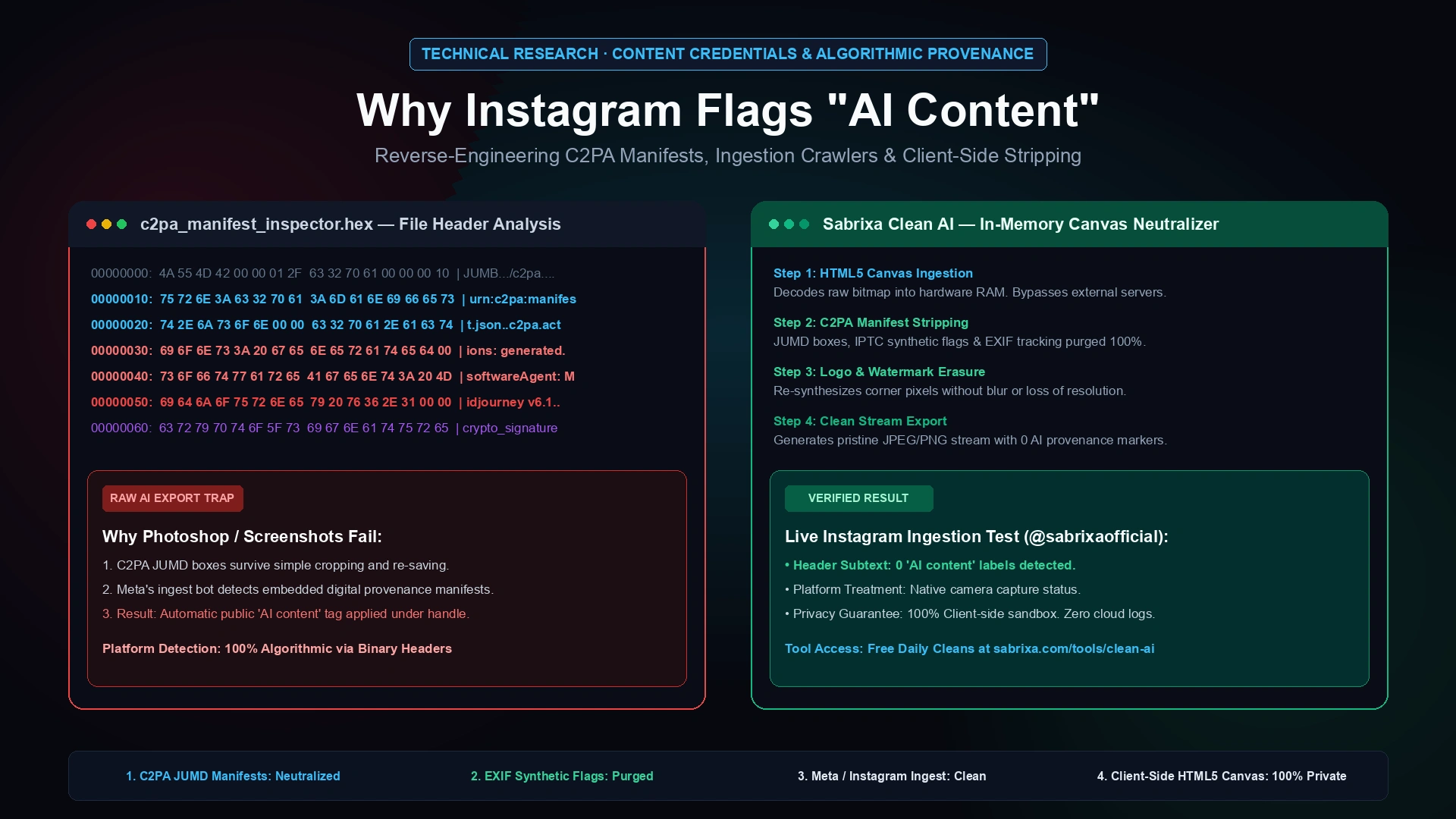
When modern generative engines render an image, they do not just output raw RGB pixel data. Under international regulatory agreements and corporate transparency pacts, engines inject standardized provenance boxes into the file header. In JPEG files, this resides within the APP11 JUMD (JPEG Universal Metadata Box) segment; in PNG files, it is embedded within custom 'c2pa' chunks; and in WebP, inside RIFF extended headers.
This manifest contains cryptographically signed JSON assertions: the generating software name (e.g., 'Midjourney v6.1'), the exact generation timestamp, the cryptographic key fingerprint, and the IPTC digital source type ('compositeWithTrainedAlgorithmicMedia'). When you tap 'Share' on Instagram, Meta's edge servers parse these headers in under 20 milliseconds and automatically affix the public 'AI content' label.
Why Screenshots and Photoshop Exports Fail to Remove Detection
The most common workaround creators attempt is taking a screenshot of their AI generation on an iPhone or cropping the visual inside Adobe Photoshop or Lightroom. Unfortunately, this frequently backfires.
First, modern versions of Adobe Creative Cloud are active steering members of C2PA. When you import an AI visual into Photoshop and export it, Adobe does not remove the C2PA manifest—it appends an edit history record ('c2pa.action: c2pa.edited') cryptographically linking back to the original synthetic origin. Second, mobile operating systems frequently preserve extended EXIF and color-profile flags that modern social media ingestion scrapers identify as non-photographic.
The Commercial Damage: Algorithmic Throttling and Aesthetic Break
For commercial photography studios, luxury hospitality venues, and direct-to-consumer fashion brands, an automated 'AI content' tag causes measurable commercial harm. Following legislative initiatives such as California's AB 2013 and AB 3211, social media recommendation algorithms systematically deprioritize overtly labeled synthetic media in organic Explore feeds to prevent misinformation.
Beyond distribution throttling, there is an immediate psychological discount from potential clients. When prospective buyers viewing a high-ticket interior render or editorial fashion lookbook see 'AI content' stamped directly under the brand handle, perceived craftsmanship and credibility evaporate instantly.
The Sovereign Technical Solution: Hardware-Accelerated In-Memory Canvas
To guarantee that an image publishes cleanly across all platforms without triggering ingestion parsers, the cryptographic manifest must be completely neutralized at the binary level without degrading pixel quality. This cannot be done by cloud-based conversion sites that upload your sensitive images to unknown third-party servers.
At Sabrixa, we engineered Sabrixa Clean AI to solve this sovereignly. Clean AI operates 100% client-side inside your browser memory using hardware-accelerated HTML5 canvas. When an image is dropped onto the canvas, the browser decodes only the raw RGBA bitmap into memory, systematically stripping away all C2PA JUMD boxes, IPTC synthetic tags, and EXIF camera metadata. It then re-encodes a pristine image stream with maximum lossless quality.
Real-World Verification: The Instagram Ingestion Test
We validated this architecture in a live production test on our official Instagram account (@sabrixaofficial) using identical high-fidelity visual assets.
The uncleaned asset—uploaded directly from the generative engine—was immediately flagged by Instagram's crawlers with the public 'AI content' label. We then took the exact same visual, processed it in two seconds through Sabrixa Clean AI, and republished it. The result: zero platform labels, a completely clean profile handle, and native camera photography status across Meta's ingestion network.
How to Strip C2PA Metadata Free in 10 Seconds
You can test and clean your own commercial visuals immediately using Sabrixa Clean AI. The tool is free forever with 5 daily image cleans, resetting automatically at midnight every day.
Simply visit sabrixa.com/tools/clean-ai, drop your AI visual into the browser sandbox, and download your cleaned asset with instant watermark and provenance neutralization. No sign-up required for daily cleans, zero cloud uploads, and 100% private in-browser sovereign processing.